AWS Lambda Managed Instances: Serverless Simplicity with EC2 Power
What if you could retain Lambda’s simplicity while running it on EC2 without managing servers? AWS re: Invent 2025 answered this with Lambda Managed Instances.
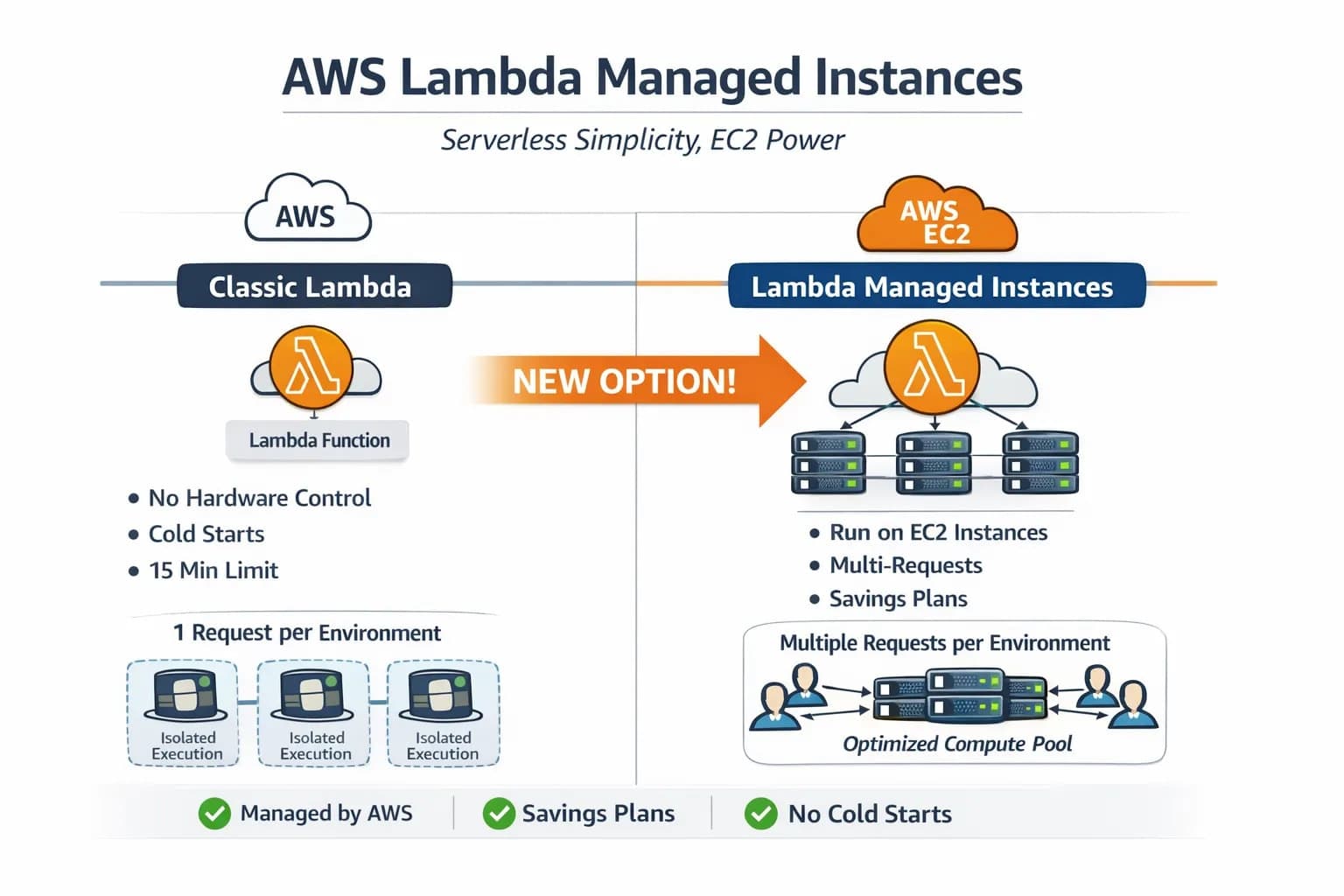
If you’re new to AWS networking or Serverless, don’t worry, this article explains what it really is, why it exists, and when you should and shouldn’t use it, in simple wording with real scenarios.
Quick background: How Lambda worked before
Traditionally, AWS Lambda was fully serverless:
You upload code
AWS runs it
You don’t know (or care) where it runs
Advantages
No server management
Scales automatically
Pay only when it runs
Limitations
No control over hardware
Cold starts
No EC2 Savings Plans / Reserved Instances
One execution environment → one request
For many teams, this was fine until workloads became predictable and heavy.
The real-world problem AWS saw
Many companies said:
We want Lambda, but…
We need a better CPU.
We want Graviton.
We want Reserved Instances.
We want predictable latency.
So, teams were forced to move from Lambda to EC2, losing the benefits of serverless computing. AWS fixed this tension.
What are AWS Lambda Managed Instances?
Lambda Managed Instances lets AWS run your Lambda functions on EC2 instances that AWS fully manages for you.
You still:
Write Lambda code
Deploy like Lambda
Use triggers, IAM, CloudWatch
But now:
Lambda runs on EC2 instances inside your AWS account
You don’t manage those EC2s
Important clarity: You are NOT managing EC2
This is NOT:
Logging into EC2
Setting Auto Scaling Groups
Configuring load balancers
Patching OS
AWS does all of that automatically. You only tell AWS what kind of compute you want, not how to manage it.
Why does VPC suddenly matter here?
Classic Lambda:
Runs in AWS-owned infrastructure
VPC is hidden from you
Lambda Managed Instances:
Uses real EC2 instances
EC2 must live inside a VPC
So AWS asks:
Which VPC?
Which subnets?
Which security groups?
That’s why VPC is mandatory here.
Introducing Capacity Providers
A Capacity Provider is simply: A configuration that tells AWS how to create and manage EC2 capacity for Lambda.
Inside a capacity provider, you define:
VPC
Subnets
Security groups
EC2 instance types (or let AWS choose)
Max vCPU limit
Scaling rules
Think of it as: A private pool of compute for Lambda, managed by AWS.
Important mindset shift
Lambda Managed Instances are not “better Lambda”. They are Lambda optimized for steady workloads. AWS didn’t replace Lambda. It expanded.
Final takeaway
AWS Lambda Managed Instances give you:
Lambda developer experience
EC2 performance and pricing
Zero infrastructure management
Predictable and high-performance serverless compute
For teams stuck between Lambda and EC2, this is the missing bridge.
More reading: https://docs.aws.amazon.com/lambda/latest/dg/lambda-managed-instances-getting-started.html